

What is a VPN and how does a Virtual Private Network work?
A VPN is an encrypted connection between a device (e.g. a laptop or smartphone) or a location and a destination network (e.g. your company network). Technically speaking, your company data is therefore transmitted via a ‘tunnel’ rather than travelling unprotected over the internet. This makes it significantly more difficult for third parties to intercept or manipulate the data traffic.
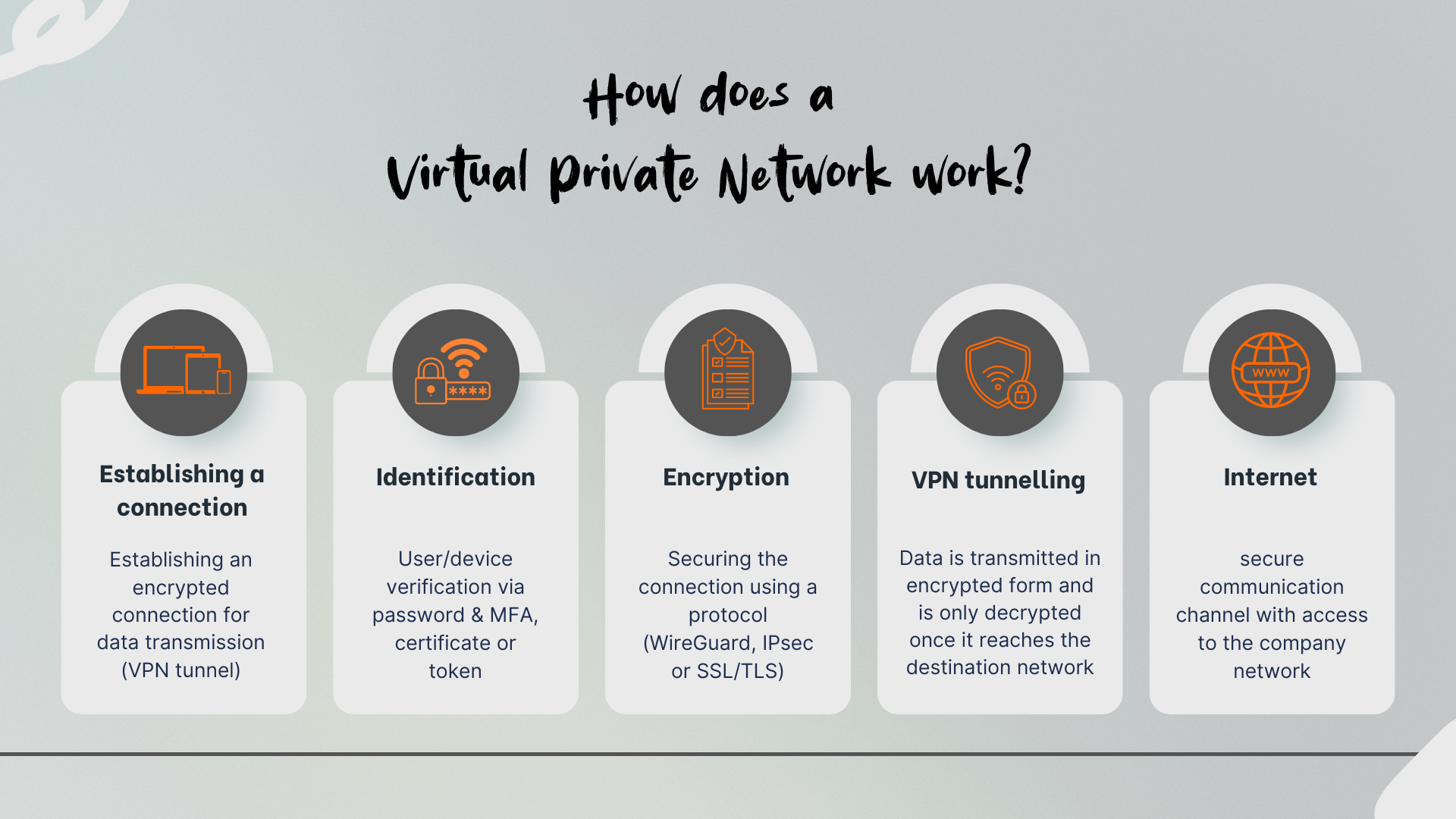
In simple terms, a Virtual Private Network operates in four steps:
Establishing the connection: To ensure secure data transmission, an encrypted connection – known as a VPN tunnel – must be established. The tunnel transmits data virtually and connects any two endpoints – usually a VPN client with a VPN gateway or VPN server (often a firewall or a router with VPN functionality). The framework for communication between participants within the connection is defined by a protocol and parameters (including encryption methods).
Authentication: For a secure VPN connection, users and/or devices must identify themselves and prove that they originate only from an authorised source. Identification can be carried out, for example, using a password and multi-factor authentication (MFA), a certificate or a token.
Encryption: VPNs use strong encryption protocols to establish a secure, encrypted connection over public networks. These include, for example, WireGuard, IPsec or SSL/TLS.
Tunnel operation: Data is transmitted in encrypted form and only decrypted once it reaches the destination network.
The aim of the VPN is to provide controlled access to the company network – without compromising existing security standards and thereby creating an additional point of vulnerability.
Typical areas of application in day-to-day business
A VPN connects users or locations as if they were directly on the company network, even though they are physically working from outside the office. A Virtual Private Network is therefore much more than just ‘remote working access’. In practice, it has a wide range of applications.
Secure remote access for employees
Employees need access to internal resources such as file servers, ERP, CRM, internal web applications or other tools. Without a VPN, work is often carried out using open ports, direct file shares or poorly secured remote tools. A VPN centralises access via a defined entry point. This reduces the attack surface, as you need to make fewer services directly accessible from the internet. In addition, you can make access subject to conditions, such as device type, compliance status, location or time.
Site-to-site networking between head office and branch offices
Branch offices, warehouses, production sites or small offices often require reliable connections to the head office. A site-to-site VPN connects entire networks with one another, not just individual users. This allows services to be provided centrally, such as Active Directory, VoIP, monitoring, or centralised print and file services. Careful network planning is essential here: address ranges must not overlap, routing must be unambiguous, and there must be clear rules governing which networks are permitted to communicate with one another.
External partners, maintenance and service provider access
Service providers often require access for maintenance, updates or troubleshooting. A VPN is a suitable way to manage this access in a controlled manner. Best practice is to use a separate partner profile with restricted rights, time-limited accounts and traceable logging. Where possible, access should be restricted to individual systems or segments rather than granting blanket access to ‘the entire network’.
An overview of VPN types and protocols
Not every VPN is suitable for every scenario. In projects, a distinction is usually made based on the type of use and the protocol.
| VPN typ | Task | Example | Advantages | Challenges |
|---|---|---|---|---|
| Client-to-Site | Allows individual users to connect securely to a company network whilst on the move | Working from home, travel, changing locations | Flexible use, clear user assignment | Client/device management, particularly when many different operating systems are in use |
| Site-to-Site-VPN | Secures a connection between two separate networks via the internet (network-to-network connection) | Head office ↔ Branch office | Predictable, stable, often easy to monitor | Redundancy and monitoring required |
| End-to-End-VPN | Describes a client accessing another client on a remote network | Remote desktop access via public networks: TeamViewer or GoToMyPC | End-to-end encryption, highly granular access control | High operational overhead (keys/certificates) |
An overview of common encryption protocols
IPsec: IPsec is standard in many corporate networks, particularly for site-to-site VPNs. It is well-established, widely supported and well-documented. In practice, the implementation within the respective vendor’s stack often determines ease of use and troubleshooting.
TLS: TLS-based VPNs are often used when user-friendliness and simple client deployment are the main priorities. In some cases, browser-based access is also possible if only individual applications are to be provided.
WireGuard: WireGuard is frequently used due to its lean architecture, good performance and simple configuration. Whether it is the right choice depends on how well it can be integrated into your identity and policy environment.
Security and Data Protection: What a VPN can and cannot do
A VPN demonstrates its strengths primarily during data transmission. Nevertheless, it is important to be aware of its limitations, as whilst a VPN ensures a secure connection, it does not replace proper access rights management or a comprehensive security strategy.
A VPN protects the data in transit, but does not automatically protect the device itself. If a laptop is compromised, an attacker can use the tunnel just like a legitimate user. That is why update management, Endpoint Detection and Response (EDR), disk encryption and restrictive permissions on the device are also essential.
A VPN is no substitute for a firewall or network segmentation. The tunnel provides access, but control takes place within the destination network. Without network segmentation and clear rules, users often access more systems than necessary. This increases the risk if login credentials are stolen.
A VPN does not automatically provide anonymity. Depending on the setup, the operator of the VPN endpoint can see metadata such as connection time, source IP address or accounts used. In addition, DNS or proxy settings can reveal which destinations are being accessed. It is therefore important for organisations to define DNS and routing clearly and to avoid misconfigurations.
Logging is a data protection issue. Logs assist with incident response and compliance, but must not be collected without limit. Define which events you really need, who has access to logs, and how long data is stored.
In short: a VPN is a key component – combined with MFA, update management, endpoint protection and network segmentation, it forms a robust setup.
Best practices for a resilient Virtual Private Network
Many VPN issues arise not from encryption, but from operational practices, permissions and a lack of standards. When setting up a VPN, it is worth designing a carefully planned configuration in advance. In practice, these points will provide you with noticeably greater stability and security:
Mandatory multi-factor authentication
Enforce MFA for all VPN logins, particularly for admin accounts and privileged roles. Combine this with policies such as ‘MFA on new devices’ or ‘MFA at unusual locations’, if your identity provider supports this.
Role-based access instead of full access
Define profiles by department or role, for example, sales, IT operations, or external partners. Specify which subnets and ports are accessible. A common mistake is a VPN that automatically grants access to the entire internal network.
Segmentation and clear network boundaries
Separate server networks, client networks, management networks and partner access points. If one access point is compromised, the damage remains limited. Segmentation also aids troubleshooting, as data flows become easier to trace.
Make a conscious decision on split tunnelling
When internet traffic is routed directly to the internet in parallel, this reduces the load on your central network and saves bandwidth. At the same time, the demands on endpoint security, DNS protection and web filtering increase. If you use split tunnelling, the devices must be managed particularly carefully. Without this, full tunnelling is often the more robust choice.
Treat endpoints as part of the security chain
A VPN should only be used by devices that meet certain minimum standards. These include up-to-date software, enabled disk encryption, no local admin account, up-to-date endpoint protection and defined MDM policies.
Monitoring, logging and alerting
Monitor login attempts, failed attempts, new devices, unusual times and conspicuous data volumes. Set meaningful alerts so that security events do not get lost in the log.
Planning for high availability and maintenance windows
VPN gateways are critical. Plan for redundancy, check certificate expiry dates, document configurations and define maintenance windows. Many outages are caused by expired certificates or forgotten changes to the identity system.
Realistically dimension performance and capacity
Encryption consumes CPU resources, particularly with many concurrent users and high throughput. Anticipate peaks, such as during morning logins or large file transfers. Allow for reserves and test performance under load.
Common VPN errors – and how to avoid them
Common stumbling block:
- Outdated protocols / weak settings
- No MFA (“A password alone is enough”)
- Full access to the internal network instead of role-based permissions
- No log analysis (Anomalies go undetected)
- Underpowered hardware → poor performance and crashes
Solve this with:
- Assigning roles and policies instead of “everyone has access to everything”
- MFA as the standard login
- Regular updates
- Continuous monitoring and clear operational responsibilities
VPN as a solid foundation for secure remote access
A Virtual Private Network is a key component of network management if you wish to provide controlled and encrypted external access. When planning and setting up a VPN, robust authentication and authorisation, clearly defined permissions, sufficient bandwidth and, consequently, reliable operation are crucial. If you operate a VPN as part of an overall strategy comprising firewall rules, segmentation and clear operational processes, access to your company network – even from outside the premises – becomes predictable, stable and secure.
Advice and suitable hardware at it-market.com
If you’d like to set up, expand or upgrade your VPN, we’d be happy to assist you. At it-market.com, you can find suitable network and security hardware, available as new or refurbished by our certified technicians. Benefit from a 3-year warranty for B2B customers on new and refurbished goods. Our team will be happy to advise you on the best choice to suit your requirements and budget.
Frequently asked questions about a Virtual Private Network
1) What is a VPN and what is it used for in businesses?
A VPN is an encrypted connection between a device or a location and the company network. Businesses primarily use VPNs for secure remote access (working from home, travelling), for connecting different locations, and for controlled access by external service providers.2) What is the difference between a VPN and standard internet access?
A VPN enables an encrypted connection to a private network via the public internet – a secure ‘tunnel’ – so that internal systems can be accessed securely without being exposed to the public. With standard internet access, communication takes place directly over the public network, without this secure, logically separated connection to the internal network.3) Does a Virtual Private Network automatically protect against all cyberattacks?
No. A VPN primarily protects data during transmission, but it is no substitute for endpoint security, network segmentation or firewall rules. If an endpoint device is compromised or permissions are too broad, a VPN can even be exploited to gain access to internal systems.4) What is the difference between a remote access VPN and a site-to-site VPN?
A remote access VPN is designed for individual users accessing internal resources from outside the network. A site-to-site VPN (also known as a site VPN) permanently connects entire networks, such as a head office and branch offices. Which option is right for you depends on whether you need to connect individuals or entire sites.5) What should I pay particular attention to when implementing a VPN?
Key considerations include multi-factor authentication, role-based access, segmentation, a clear decision on split tunnelling, secure endpoints, as well as monitoring and logging. Furthermore, capacity, redundancy and certificate validity periods should be planned for from the outset.