

Wi-Fi standards: A brief overview
Wi-Fi standards are published by the IEEE (Institute of Electrical and Electronics Engineers) under the designation 802.11 and govern how devices communicate wirelessly with one another: usable frequency bands, channel width, modulation schemes, the number of parallel data streams, and the allocation of radio resources amongst multiple clients. They also ensure that hardware from different manufacturers is compatible.
Each new standard generally brings with it higher data rates, better use of the spectrum and additional features for security and stability. For businesses, however, choosing the right network standard is not purely a technical matter. Rather, it is a decision about how many devices will be able to operate reliably at the same time in the future, how responsively applications will run and how future-proof the network is overall.
WLAN or Wi-Fi? Colloquially, both terms mean the same thing, but technically they do not. WLAN stands for Wireless Local Area Network and describes the wireless network itself. Wi-Fi is a coined term by the Wi-Fi Alliance, a trade association of manufacturers, and refers to the certification. In practice, WLAN 7 and Wi-Fi 7 refer to the same technology.
From 802.11n to WLAN 802.11ac: The path to Wi-Fi 7
To put the development of Wi-Fi 7 into context, it is worth taking a look at the previous generations.
802.11n, better known as WLAN 802.11n, was one of the first standards to make Wi-Fi truly practical in an enterprise setting. It introduced MIMO (Multiple Input, Multiple Output) technology, which allowed multiple data streams to be transmitted and received simultaneously via multiple antennas. This significantly increased both range and speed compared with older standards.
The next major step came with WLAN 802.11ac. The standard relied heavily on the 5 GHz band, wider channels and even more spatial data streams. For many businesses, 802.11ac formed the basis for stable Wi-Fi networks for many years, as it delivered significantly higher bandwidths than its predecessor whilst operating with less interference than pure 2.4 GHz solutions.
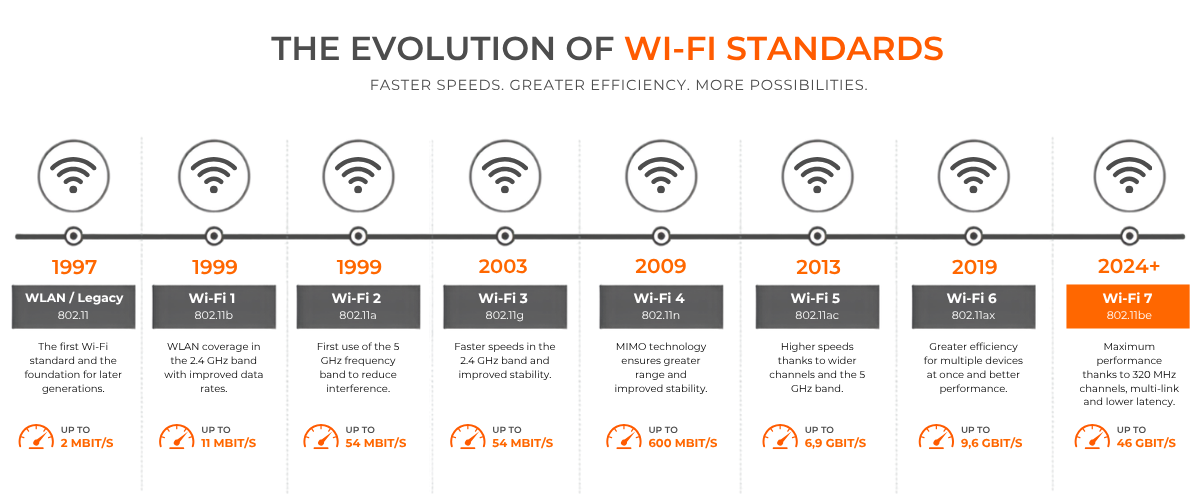
Wi-Fi standards: a comparison of the generations
The following table of Wi-Fi standards shows the evolution of the generations, along with the frequency bands used by each and the maximum data rate.
| Generation | IEEE | Data rate (Mbit/s) | 2,4 GHz | 5 GHz | 6 GHz | Channel width | IEEE-Year |
|---|---|---|---|---|---|---|---|
| WLAN/Legacy | 802.11 | max. 2 | √ | - | - | 1 MHz (FHSS) / ca. 22 MHz (DSSS) | 1997 |
| Wi-Fi 1 | 802.11b | max. 11 | √ | - | - | ca. 22 MHz | 1999 |
| Wi-Fi 2 | 802.11a | max. 54 | - | √ | - | 20 MHz | 1999 |
| Wi-Fi 3 | 802.11g | max. 54 | √ | - | - | 20 MHz | 2003 |
| Wi-Fi 4 | 802.11n | max. 600 | √ | √ | - | 20 / 40 MHz | 2009 |
| Wi-Fi 5 | 802.11ac | max. 6.933 | - | √ | - | 20 / 40 / 80 / 160 MHz | 2013 |
| Wi-Fi 6 | 802.11ax | max. 9.608 | √ | √ | -* | 20 / 40 / 80 / 160 MHz | 2021 |
| Wi-Fi 6E | 802.11ax | max. 9.608 | √** | √** | √ | 20 / 40 / 80 / 160 MHz | 2021 |
| Wi-Fi 7 | 802.11be | max. 46.120 | √ | √ | √ | 20 / 40 / 80 / 160 / 320 MHz | 2024 |
The designations Wi-Fi 1 to Wi-Fi 3 were assigned retrospectively and are not official names used by the Wi-Fi Alliance.
The leap from Wi-Fi 6 to Wi-Fi 7 is not the result of a single innovation, but of three factors acting simultaneously: double the channel bandwidth (320 MHz instead of 160 MHz), denser modulation (4096-QAM instead of 1024-QAM) and twice as many parallel data streams (16 instead of 8).
Wi-Fi 7 vs. Wi-Fi 6: a direct comparison
Compared with previous Wi-Fi standards, Wi-Fi 7 offers four key improvements. Transmission speeds increase noticeably, whilst the doubled number of simultaneous data streams ensures greater stability in networks with many active devices. Added to this is a revised latency management system, which particularly benefits time-critical applications. Last but not least, the 6 GHz band is being fully utilised for the first time, meaning additional free channels and less interference.
Wider channels for higher throughput
Wi-Fi 7 supports channel widths of up to 320 MHz – twice that of Wi-Fi 6E. This allows for significantly higher data rates, particularly for applications with high bandwidth requirements such as video conferencing, large data transfers or cloud backups.
Multi-Link Operation (MLO)
One of the most significant innovations is Multi-Link Operation. For the first time, a client uses several frequency bands simultaneously for transmission and reception, for example by combining the 5 GHz and 6 GHz bands, or by switching between them in the event of interference without interruption. This increases throughput and, above all, reduces latency and jitter. For video conferencing, VoIP, cloud applications and control technology, this is more relevant than ever.
Higher modulation with 4096-QAM
With 4096-QAM, the amount of data that can be transmitted per transmission step increases significantly once again compared to the 1024-QAM used in Wi-Fi 6. In practice, this means higher theoretical maximum speeds, provided the environment delivers a sufficiently stable signal.
Wi-Fi 7 continues to operate on the familiar 2.4 GHz, 5 GHz and 6 GHz bands, but combines them more intelligently than previous Wi-Fi standards.
Preamble Puncturing and Multi-RU
Previously, a wide channel had to be completely clear. Wi-Fi 7 filters out affected sections and continues to use the rest. In addition, multiple radio resources can be allocated to a single client simultaneously. Both of these features improve utilisation in environments with many neighbouring networks.
| Feature | Wi-Fi 6 / 6E | Wi-Fi 7 |
|---|---|---|
| Max. data rate | 9,6 Gbit/s | 46,1 Gbit/s |
| Max. channel bandwidth | 160 MHz | 320 MHz |
| Modulation | 1024-QAM | 4096-QAM |
| Data streams | 8 | 16 |
| Simultaneous frequency bands | no | yes (Multi-link operation) |
| Handling of interfered-with channels | Channel is avoided | Interfered-with sub-band is suppressed |
Who would benefit from switching to Wi-Fi 7?
Not every business needs the latest technology straight away. Switching to Wi-Fi 7 is particularly worthwhile if:
Many devices require high bandwidths simultaneously, for example with data-intensive applications or video streaming (e.g. schools, medical practices, hotels or manufacturing halls)
Low latency is crucial, for example in real-time communication or industrial control applications.
The existing infrastructure is already reaching its capacity limits and Wi-Fi 802.11ac or older standards are no longer sufficient.
A long-term investment in the network infrastructure is planned and future-proofing is a priority, for example in new builds and initial set-up.
For smaller networks with a manageable number of devices and moderate bandwidth requirements, however, Wi-Fi 6 or Wi-Fi 6E often continue to provide a solid foundation. In such cases, refurbished Wi-Fi 6 hardware is often the more cost-effective choice, particularly for expansions using identical models. A mixed deployment also works: Wi-Fi 7 in high-traffic areas, Wi-Fi 6 in warehouses, corridors and ancillary rooms.
What businesses should consider before making a purchase
Simply switching to a new Wi-Fi standard only delivers real added value if the rest of the infrastructure is up to scratch. This includes, amongst other things, sufficiently powerful switches with the appropriate port speeds, careful planning of wireless cells, and compatible end devices that support Wi-Fi 7 in the first place.
Compatibility with existing hardware also plays a role. As Wi-Fi 7 is backwards-compatible, older devices can still be integrated without any problems, but they will not benefit from all the new features.
Conclusion
Wi-Fi 7 marks a significant technical advance over previous Wi-Fi standards. Wider channels, multi-link operation and higher modulation ensure greater speeds, lower latency and more stable connections. Whether it is already worth making the switch, however, depends heavily on individual needs. Organisations with high data volumes and many simultaneously active end devices will benefit particularly quickly, whilst for others, Wi-Fi 6 or Wi-Fi 6E may still be sufficient.
Professional advice on Wi-Fi solutions from it-market
Are you considering upgrading your Wi-Fi infrastructure or switching to Wi-Fi 7? At it-market, you’ll find a wide selection of access points, switches and other network components from a wide range of manufacturers.
Our sales team will help you choose the right solution for your business network. All devices are available as new or fully refurbished through IT remarketing, and come with a warranty of up to 3 years for businesses.
FAQ: Frequently asked questions about Wi-Fi standards and Wi-Fi 7
What distinguishes Wi-Fi 7 from WLAN 802.11ac and Wi-Fi 6?
WLAN 802.11ac and Wi-Fi 6 operate with narrower channel bandwidths and lower modulation. Wi-Fi 7 (802.11be) supports channels up to 320 MHz, 4096-QAM and multi-link operation, enabling higher speeds and more stable connections.Is Wi-Fi 7 backwards compatible with older Wi-Fi standards such as 802.11n?
Yes, Wi-Fi 7 is backwards compatible. Devices that still operate on 802.11n or 802.11ac can still be connected, but will not utilise the new features of Wi-Fi 7.Do I need new hardware to use Wi-Fi 7?
Yes, both the access points and the end devices must support Wi-Fi 7. In addition, the rest of the network infrastructure, such as switches and cabling, should be designed to cope with the required performance.Is it worth upgrading from Wi-Fi 6 to Wi-Fi 7 at this stage?
That depends on your needs. If you have high data volumes, many devices active simultaneously, or are planning new purchases, Wi-Fi 7 is already worth considering. For smaller networks, Wi-Fi 6 or Wi-Fi 6E is often still sufficient.